E N G L I S H – change to german here
About the Tetra Data Messaging Java Application LAN-SDS
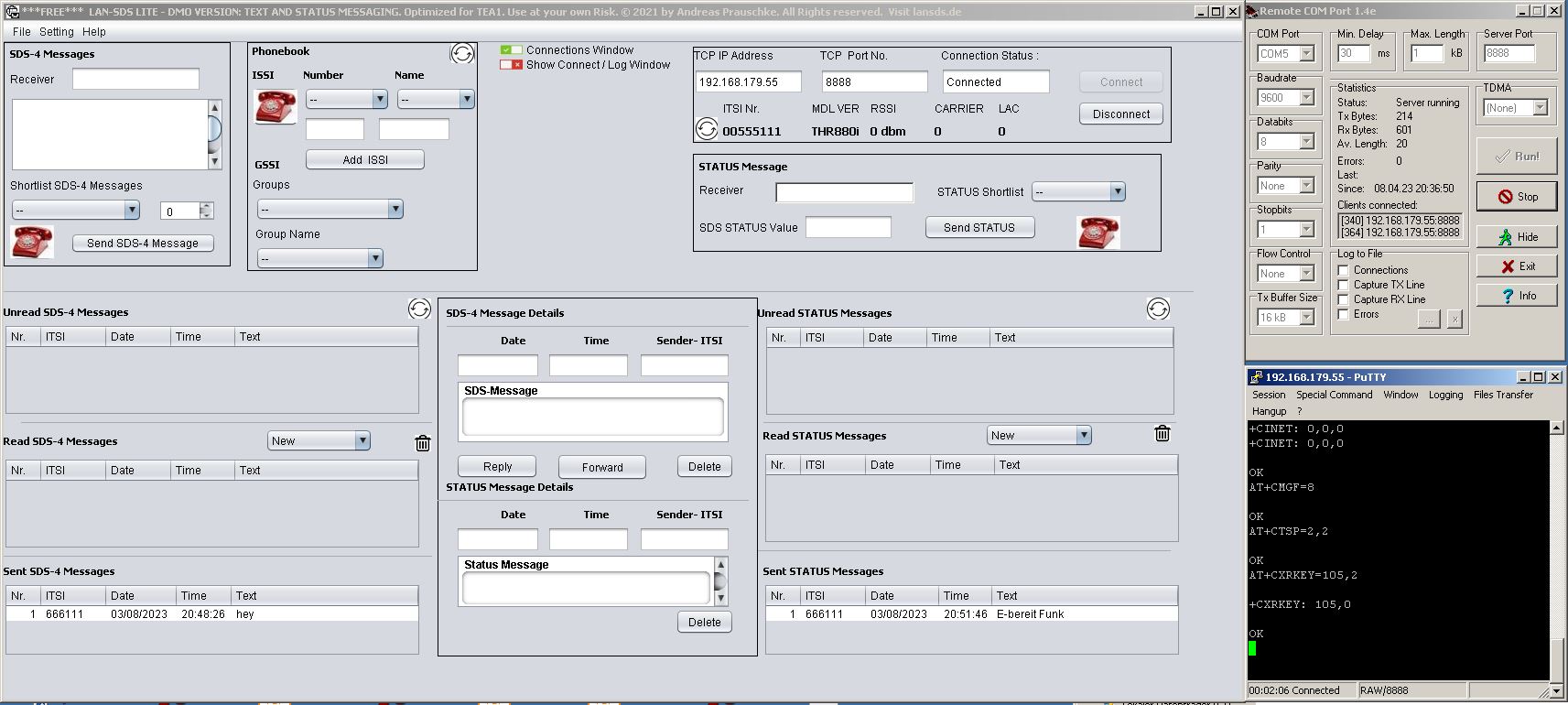
LAN-SDS is a Data Messaging Software for TETRA DMO and TMO
We ( My Coders and me Andreas as the owner ) started with basic Messaging Functionalities over 10 Years ago with a Java Desktop Application. Over the Years we added a Webversion using Angular and added an Android Application inside the Android Store. All these Basic Messaging Application – have a Phonebook for ISSI or GSSI Numbers. You can define your own Pre Select Pattern and you define the Status Meaning as well as the Hex Value according to your needs. These Basic Messaging Skills for Text and Status are called Lite Version.
We built several Versions. The Webversion, Android App or our most used Java Desktop Application that connects to the Cassidian Radio Terminal. Our LAN-SDS Application offers you the possibility to connect to your TETRA Radio Terminal from remote or inside the LAN. We use Java on the Receiver Radio Terminals well. We use the Java MIDP Apps for our Picture Application that offer our SQL-SDS Feature as well. You can think about Ping-Pong. Send a Message and you will receive a up to date Database Information. The Minimum Setup is only one EADS/ or Cassidian or Airbus Radio Terminal to to so.
If you want to use the SQL-SDS ( that is realized by a Text File or Database Base Solution) you can use our LAN-SDS Java Application with TEA1 and TEA2 Motorola or Sepura Radio Terminals or TEA1 Hytera Industry Tetra Radio Terminals.
So for the other Radio Terminal Vendors. We make it simple so you just have to insert a # in front of your Text Message that represents a Database Search Entry / Match Pattern inside our Java Logic – So just send a message as like #helloworld towards the LAN-SDS ISSI Number and you will receive an up to date Message returned to you in a second. Why because on you on Application Side you can update the File or Database Entry in a second if needed..
We built a Firewall ISSI Subfeature that you can choose inside the Menu. So you can add or block users or TETRA ISSI Ranges.
For the Full Version we added unique Features and enhanced these Features over the Years. BOS and Industry Customer are different. For the Industry we built Features as like Twitter Message and Bidirectional-Telegram to TETRA Feature. For Authorities these are bit more Special that is why an optimized TEA2 Full Version was created. Our Applicatins have been tested successfully inside the BOS Network where we have the Opportunity to use the Network because of Software Developer Program with our local Authoritiesierte Stelle.
You will see that is it a bit of effort to write a Status or Text Message on your Handheld or Carkit Radio Terminal. That is why you can run LAN-SDS on a Computer and just open the Java Application to do so. You will have your own Control Station where you can send Messages in a second and all incoming and outgoing Messages are saved. As well we care about the Acknowledgments so you can see the Message arrived or not. We built a optimized P8GR Version because the Pager has some limited AT Command Set but has enhanced Features more Altering. So we coded a own Subversion. Nevertheless you will see that all Lite Versions have the same Feature Set. Of course all Features inside the Lite Version are available in the Full Version, too.
LAN-SDS Application Requirements : for your EADS / Cassidian / Airbus Radio Terminal
Minimum Setup :
- 1x Data Cable for THR880i, THR9, TMR880i, TDM880i, TDR880i, TW1m or P8GR
- Windows or Linux PC or any Device that runs JAVA 8_91version with at least 1GB RAM
- Supported Cassidian Radio Terminal Firmware is 6.69 up to 7.71
- “AT Command Set” Parameter via TPT or TAQTO must be v.7.2
- Java Version must be 8u91 version.
Serial to IP – Professional Setup:
Add an external Serial to TCP/IP Converter Hardware and connect the Cassidian Radio Terminal into the LAN. Recommended Hardware is “Perle IOLAN Device” -> Data Cable -> Cassidian Tetra Device.
IOLAN SDS-D Device Servers | Serial to Ethernet | Perle
There are several LAN-SDS Versions available:
AT-Commands for DMO or TMO Mode are a bit different that are sent and received on the AT Command Line. That is why we built several LAN-SDS Light Versions . There is TEA1 (Industry) and TEA2 (Authorities) Radio Terminals. TEA3 Radio Terminals for outside Europe can be used, too using the TEA1 optimized Version. For all Java Applications the Rule is same is to use v.7.2 AT Command Set. This Parameter can be easily configured inside TPT oder TAQTO Tool.
About LAN-SDS Full Version
The Full Version offers more Features as like manual and periodic GPS Tracking in DMO or TMO. Another unique Feature is SQL-SDS. The Users outside can request Database Information by sending a Text Message,
Send a Tetra Text Message to the LAN SDS ISSI Number. The Message comes in via standard Tetra SDS-4 Text Message and our Java Logic cares about and the Java LAN-SDS Application searches the Database Entry and answer you automatically with a Text Message. This Data Information on demand Service works automatically 24/7 by its own.
Contact Details:
info@tetraterminal.com
service@tetraterminal.com

Allgemeinzuteilung: Funkamateure dürfen das dem DARC zugeteilten 70cm Band bzw. die jeweiligen Bündelfunknetzfrequenzen und somit auch on top laut Allgemeinzuteilung die allgemein verfügbaren zugeteilten Frequenzen nutzen.
Mittenfrequenz in MHz | Maximale äquivalente Strahlungsleistung (ERP) in Watt | Kanalbandbreite in kHz
420,00000 1,0 12,5
419,99375 2,0 25,0
Bundesnetzagentur – Allgemeinzuteilungen
Allgemeinzuteilung Bündelfunknetze (Vfg.36/2026)
Bandpläne – DARC 430-440 MHz
UHF_Bandplan_70_cm_Mai_2025.pdf
Our Lite Versions:
- TEA1 Industry
- TEA2 Authorities
- TEA Special Edition P8GR Version compatible for both TEA1 and TEA2
Our Full Versions supports:
- TEA1 and TEA2 AT Command Variations by using a mariadb Database
- All Messages received or sent are saved in the Database as well as GPS Tracking Positions – you can choose the format of the GPS Coordinate / Satellite ( in my opinion you need to have at least three or four satelittes to get a match your coordinate – see TPT GPS Settings ) by Menu
VAR offers you Radio Terminal that meets the recommended Settings in order to use these Features. Welcome
Radio Terminal Portfolio – > Tetra Radio Terminal Specification Paper there
TETRA Radio Communication | Airbus
Radio Terminal Distributors: